Find exact answers
Search specifications, dates, measurements, table values, and requirements buried across large files.
 OpenIntelligence
by Gunnar Hostetler
OpenIntelligence
by Gunnar Hostetler
Open Source · Built on Apple Intelligence
OpenIntelligence turns your PDFs, Office documents, spreadsheets, presentations, notes, scans, code, and audio or video recordings into searchable libraries on iPhone, iPad, and Mac — then answers with citations you can tap to verify. Retrieval and verification always run on your device, and on-device answering works in airplane mode with no account and no API keys. Every answer carries a badge showing the route that actually ran, read from an execution receipt rather than from what was requested. On iOS and macOS 27, long, evidence-heavy requests can optionally use Apple Private Cloud Compute, only after the app shows you how much would be sent and why, and you approve it. Under the hood: an open-source RAG engine built on Apple's foundation models, with Vision OCR ingestion and Metal-accelerated retrieval.


No sign-up · No API keys · On-device answering works offline · Open source
App Store 5.7 · 4.8★ from 4 ratings · App Store privacy label: Data Not Collected
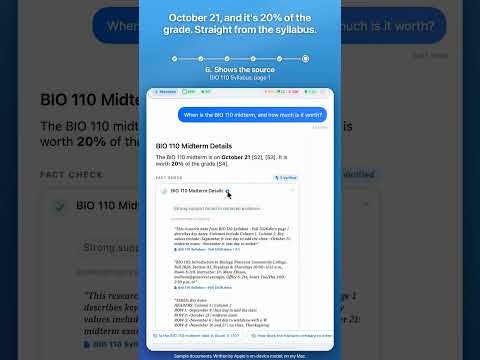
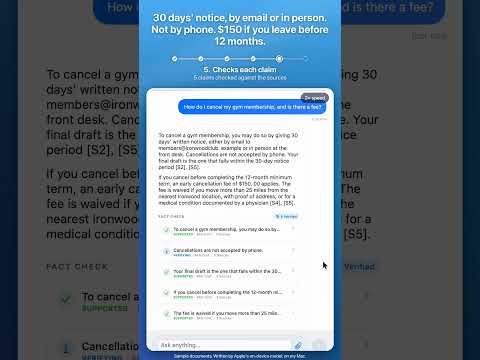
Search specifications, dates, measurements, table values, and requirements buried across large files.
Summarize reports, research papers, manuals, contracts, class notes, and meeting recordings.
Ask questions across an entire library and inspect which files and passages support the result.
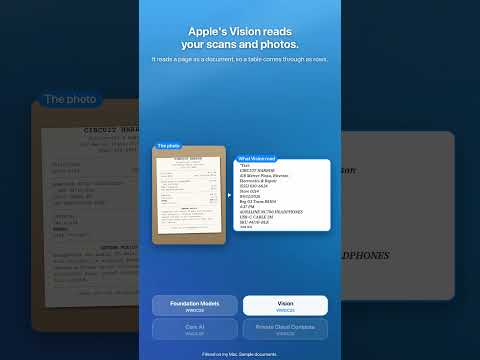
Import documents, spreadsheets, presentations, code, images, scans, audio, and video — with Vision OCR and on-device speech transcription where needed.
Tap citations to return directly to the supporting source instead of trusting an unexplained AI response.
Want to see how that works technically? Keep scrolling.
Choose Hybrid, On-Device, or Private Cloud Compute as a persistent policy. On systems older than iOS and macOS 27, every policy resolves on-device. Routing decisions happen after retrieval, based on the evidence actually found — and every answer shows a receipt-backed badge for the route that completed it.
A true native Swift engine built for iPhone, iPad, and Mac. Choose Local Only or iCloud Drive (paid plans) for each library. Runs on iOS, iPadOS, and macOS 26 and newer.
Verification Gates check each answer against the retrieved evidence, and every answer includes interactive citations that link directly to the source document.
A native multi-modal pipeline that extracts text and generates embeddings from PDFs, Office documents, text, code, images and scans (Vision OCR), audio, and video.
Deep Think and Maximum chain reasoning sessions; overview questions search per-document summaries through the RAPTOR Summary Router.
Powered by SQLite FTS5, with Metal vector search on the GPU for large libraries when the GPU profile allows.
Real-World Execution
Watch OpenIntelligence ingest files, retrieve evidence, generate an answer, and verify its citations directly on Apple hardware.
How it runs
Twelve steps from a file to a cited answer, as this page groups the work; the code branches by file type, mode, evidence and route, so no single number covers every path. Pick a quality mode and a chip, press run, and open any step to see the functions that run, the numbers they use, and what they drop. Every name here is checked against the source at each build; the full reference has the rest.
Ingestion a file becomes searchable, one document at a time
Query a question becomes an answer you can inspect
Press Run to trace all twelve steps here.
Public Roadmap
Synced nightly from the same Notion board I actually work from — not a curated highlight reel. Every entry below is a real ticket, in its real state.
Now is being built today · Next is committed to the release in development · Later is on the list but not yet scheduled · Shipped is already live in the App Store.
Loading roadmap…
Product History
Read the official version release log for OpenIntelligence, focusing on user-facing capabilities and system architectural shifts.
The current App Store release, on iPhone, iPad and Mac since October 22, 2026. This one’s about getting things in and out of the app. JSON and JSONL files import as records, Siri and Shortcuts can ask, search and add to your libraries, Spotlight and Visual Intelligence find your documents, and an answer you share takes its sources with it.
Superseded by v5.7 above. On iPhone, iPad and Mac from October 8, 2026. This one’s about your first few answers. The citations in an answer open now, numbers and times come through the way your document wrote them, and the Verified badge only shows when a check actually ran and passed.
Superseded by v5.6 above. On iPhone, iPad and Mac from September 30, 2026. One fix and lower prices this time. A “how much” question could get answered with a number from a totally different document, with a Verified badge on it.
Superseded by v5.5 above. On iPhone, iPad and Mac from September 24, 2026. This one’s all about answers. They’re done when the last word shows up, and most Deep Think and Maximum answers write out in front of you now.
Superseded by v5.4 above. On iPhone, iPad and Mac from September 18, 2026. This one is about what you meet first: the sample library’s questions, the welcome screens, and the plans. Underneath it, documents are read with Apple’s own detector and there is a new, off-by-default control over how answers are written.
Superseded by v5.3 above. On iPhone, iPad and Mac from September 10, 2026. This is the release that turns on Private Cloud Compute. Nothing about how the app reads, searches or checks your files changes; what changes is that one step, the writing of the answer, can now leave the device when it needs to, and only after you say so. It is the first build made with Xcode 27, the toolchain that compiles that path in, and that step requires iOS, iPadOS or macOS 27.
Superseded by v5.2 above. On iPhone, iPad and Mac from September 2, 2026, bringing all three back to one version. Most of this release is about the Mac, where importing a large document had become slow enough to be unusable. The text recognition changes apply to iPhone and iPad as well.
Mac only, and superseded by v5.1 above. There was no way to get a document into the app on a Mac at all. Both routes in were broken, and this fixes them. iPhone and iPad were unaffected and stayed on v5.0 below.
Superseded by v5.1 above, and the largest release so far: 90 user-facing fixes. Text was being cut short before it was ever indexed, the part that reads meaning was reading it wrong, and the chunking controls did not do what they said. All three are fixed, which is why existing libraries are offered a one-time rebuild.
Superseded by v5.0 above. Documents no longer disappear after importing, and libraries carry their work between devices instead of asking you to redo it.
Deep Think and Maximum were not wired up correctly in previous releases. This release fixes that, and everything it uncovered.
Labels now say exactly where each answer ran, and internal checks confirm the recorded route matches what actually executed.
The app searches your library before deciding where an answer runs, and Apple approved the native Private Cloud Compute entitlement.
Silicon-native embeddings, a Rust-backed tokenizer, and memory-safe ingestion for very large documents.
Approved in June 2026 by Apple App Store review. Introduces persistent iCloud-synchronized research chat sessions, slide-out sidebar, and resolved Swift 6 compiler concurrency checks.
Delivered support for third-generation Apple Foundation Models, Siri Screen Awareness AppIntents, and resolved critical MainActor deadlocks during iCloud file locking.
Rebuilt the RAG telemetry HUD with glassmorphic layouts, hardware sensory haptics, and resizable metrics bottom sheets.
.ultraThinMaterial glassmorphism.Major milestone release integrating native iOS 26+ FoundationModels APIs, Core AI embeddings, and Metal-accelerated vector search.
CoreAISentenceEmbeddingProvider for zero-copy memory layouts on Version 27+ devices.Straight Answers
Not unless you approve it. Document ingestion, embedding, search, and answer verification always run on your device, and answers are generated on-device by default. On iOS, iPadOS and macOS 27, long evidence-heavy requests can optionally use Apple Private Cloud Compute, and only after the app shows you how much would be sent and why, and you approve it. Every answer displays a badge showing the route that actually ran. On older OS versions, every query runs entirely on device.
Yes. On-device retrieval and answering run entirely on your device, so you can ingest documents and ask questions in airplane mode. Only the optional Private Cloud Compute route requires a network connection, and the app falls back on-device when there is none.
No. There is no sign-up and no API key to configure. Answers are written by Apple Intelligence, and nothing is sent to a third-party AI service.
PDFs, Office documents, text, Markdown, CSV, code, images and scans (Vision OCR), audio, and video, processed through a native multi-modal ingestion pipeline.
Yes. The full Swift source, including the RAG engine, is public on GitHub, so the privacy claims can be independently verified.
Built by Gunnar Hostetler · Support and privacy at Gunzino · More projects at Gunnarguy
Free on the App Store · iPhone, iPad, and Mac · No account, no API keys